Start with one product you can supply, a checkout customers can use, and a delivery promise you can keep. This guide takes a Ghanaian merchant from preparing a listing to reviewing the first orders. You can build a Makola store without writing code; payment verification, stock and delivery still need your attention.
See the visual tour or follow the checklist below.
1. Prepare a product that is ready to sell
Choose an item you have in stock or can reliably make or source. Write down its name, price, available quantities, options and what is included. Use your own photographs and describe facts you can check: materials, measurements, ingredients, compatibility or care instructions.
Illustrative example: “Cotton shirt, blue, size M” tells a buyer more than “Quality shirt”. Add the actual measurements and a photograph of the shirt. Do not claim a material, origin or certification unless you can verify it.
2. Create your store and finish payment setup
- Create your Makola account and follow the store setup steps.
- Choose your store name and region. Add the phone number customers should use.
- Add your product, photos, category, price and available options. Preview the public listing.
- Complete the payment and payout information requested for your account. Check any verification requirements before accepting orders.
- Review your store settings and delivery options, then check the customer checkout flow on a phone.
Makola supports mobile money and card checkout. Read the MoMo setup guide for payment confirmation and order handling.
3. Agree delivery before you advertise
Decide where you deliver, whether collection is available, and what customers pay. Ask your delivery partner about charges, packaging requirements and realistic timelines. State preparation time separately from travel time for made-to-order goods.
For a local starting point, see the guidance for Greater Accra or Ashanti. These are planning checklists, not delivery guarantees.
4. Share a direct link to the product
Put the product price and buying link in your WhatsApp replies, status or social profile. A direct product link saves customers from searching your whole catalog. Ask permission before sending promotional messages and respect requests to stop.
Use the message examples in our WhatsApp selling guide. If customers visit your business in person, also check whether you qualify for a Google Business Profile.
5. Review what happens after the click
Check the order and payment status before dispatch. Keep stock accurate, respond to questions and explain returns or collection arrangements clearly. In SEO coach, improve missing photos, descriptions and categories.
Each week, record visitors, completed orders and the questions customers asked. A useful first milestone is a successfully fulfilled order from a customer who found your store, rather than a large follower count.
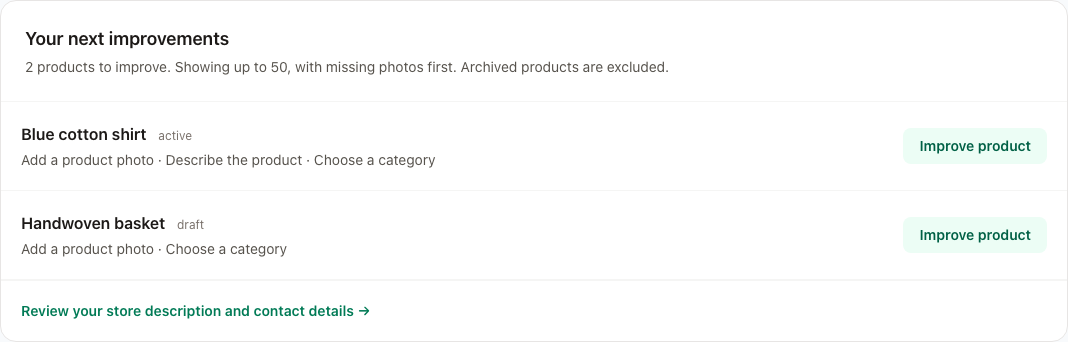
Screenshot of the working SEO coach using demonstration products, not a merchant success claim. Use “Improve product” to edit a listing, then refresh the task list.
Budget for the whole order
Check Makola’s current pricing. Include the product cost, packaging, delivery, platform charges and possible returns when setting your selling price. Free account creation does not remove the costs of supplying an order.
Common questions
Do I need to check business or payment requirements?
Yes. Requirements depend on your activity and provider. Check the current requirements with the relevant authorities and payment provider before trading; opening a software account is not confirmation that every requirement is met.
Can I sell without holding stock?
Only list a supplier’s product when you have confirmed availability, cost, fulfilment responsibility and how problems will be handled. Explain the preparation and delivery arrangements to the customer.
Which platform should I use?
Compare the complete workflow using our Ghana ecommerce platform checklist.
Questions and answers
What do I need to start selling online in Ghana?
A product with clear photos and a price, a way to take payment, a delivery plan, and a link buyers can open on a phone. The checklist above walks through each one.
How do I sell products online in Ghana from my phone?
Open a shop on a platform that works on a phone, add each product with a photo and a price, then share the shop link on WhatsApp, Instagram and TikTok. Buyers choose and pay from the link instead of asking for prices one by one.
How do I sell clothes online in Ghana?
Photograph each item in daylight, list the sizes you actually have, and state the price. Explain delivery in Accra and outside it before the buyer pays. A photo of the item being worn helps buyers judge the fit.
Can I sell online in Ghana without a website?
Yes. Many sellers start on WhatsApp and Instagram alone. A shop link adds one place where buyers see every product and price and can pay without sending you a screenshot.
Ready to prepare your first listing? Create your Makola store.